
Skip to content

QQ Anniversary Switch Bundle

qwertyqop
  • Group Buys
    Limited releases
    • Live Projects currently open for orders →
    • Preorder Reserve confirmed upcoming releases →
    • Coming Soon Preview projects before they launch →
    • Project Updates Timelines and production progress →
  • Products
    All products QQ House QQ Services Clearance
    Keycaps
    • View All
    • GMK
    • SW/SWG
    • KBS
    • Milkyway
    • Artisan Keycaps
    • More Brands
    Keyboards
    • View All
    • Prebuilt/Fully Assembled
    • Custom Kits
    • Hall Effect
    • Display Keyboards
    Switches
    • View All
    • Linear
    • Tactile
    • Silent
    • Hall Effect
    Parts and Modding
    • All Accessories
    • Lubricants & Tools
    • PCBs, Plates & Parts
    • Stabilizers
    • Other Accessories
    Desk & Display
    • Deskmats
    • Cables
    • Stands, Trays & Display
    Explore
    QQ House Designed, selected and styled by QWERTYQOP.
  • Custom Projects
  • About
    • Our Story Meet QWERTYQOP and create something with us →
    • Our Projects Firmware, software and build guides →
    • Journal News, guides and stories from the studio →
    • Visit Us Plan a visit to our Singapore showroom →
  • Support
    • FAQ Quick answers to common questions →
    • Resources & Firmware Firmware, software and build guides →
    • Contact Us Talk directly with the QWERTYQOP team →
  • Community
    • Discord Chat, ask questions and share your setup →
    • Instagram New releases, builds and studio moments →
    • Youtube Videos, product looks and build content →
  • Group Buys
    Group Buys
    • Live
    • Preorder
    • Coming Soon
    • Project Updates
  • Products
    Products
    • All Products
      All Products
      • View All
      • QQ House
      • QQ Services
      • Clearance
    • Keycaps
      Keycaps
      • View All
      • GMK
      • SW/SWG
      • KBS
      • Milkyway
      • Artisan Keycaps
      • More Brands
    • Keyboards
      Keyboards
      • View All
      • Prebuilt/Fully Assembled
      • Custom Kits
      • Hall Effect
      • Display Keyboards
    • Switches
      Switches
      • View All
      • Linear
      • Tactile
      • Silent
      • Hall Effect
    • Parts and Modding
      Parts and Modding
      • All Accessories
      • Lubricants & Tools
      • PCBs, Plates & Parts
      • Stabilizers
      • Other Accessories
    • Desk & Display
      Desk & Display
      • Deskmats
      • Cables
      • Stands, Trays & Display

    QQ House

    QQ Services

    Clearance

  • Custom Projects
  • About
    About
    • Our Story
    • Our Projects
    • Journal
    • Visit Us
  • Support
    Support
    • FAQ
    • Resources & Firmware
    • Contact Us
  • Community
    Community
    • Discord
    • Instagram
    • Youtube
Log in

Don't have an account? Sign Up!

QQ60 Hotswap PCB
QQ60 Hotswap PCB
QQ60 Hotswap PCB
QQ60 Hotswap PCB

qwertyqop

QQ60 Hotswap PCB

$75.00 SGD $0.00 SGD Unit price /

Shipping calculated at checkout

Project progress

  1. 1 Paid
  2. 2 Production
  3. 3 In transit
  4. 4 QC in SG
  5. 5 Fulfilment
  6. 6 Extras
View all project updates →

Style

  • Standard JST
  • Alternate JST

Quantity


Description
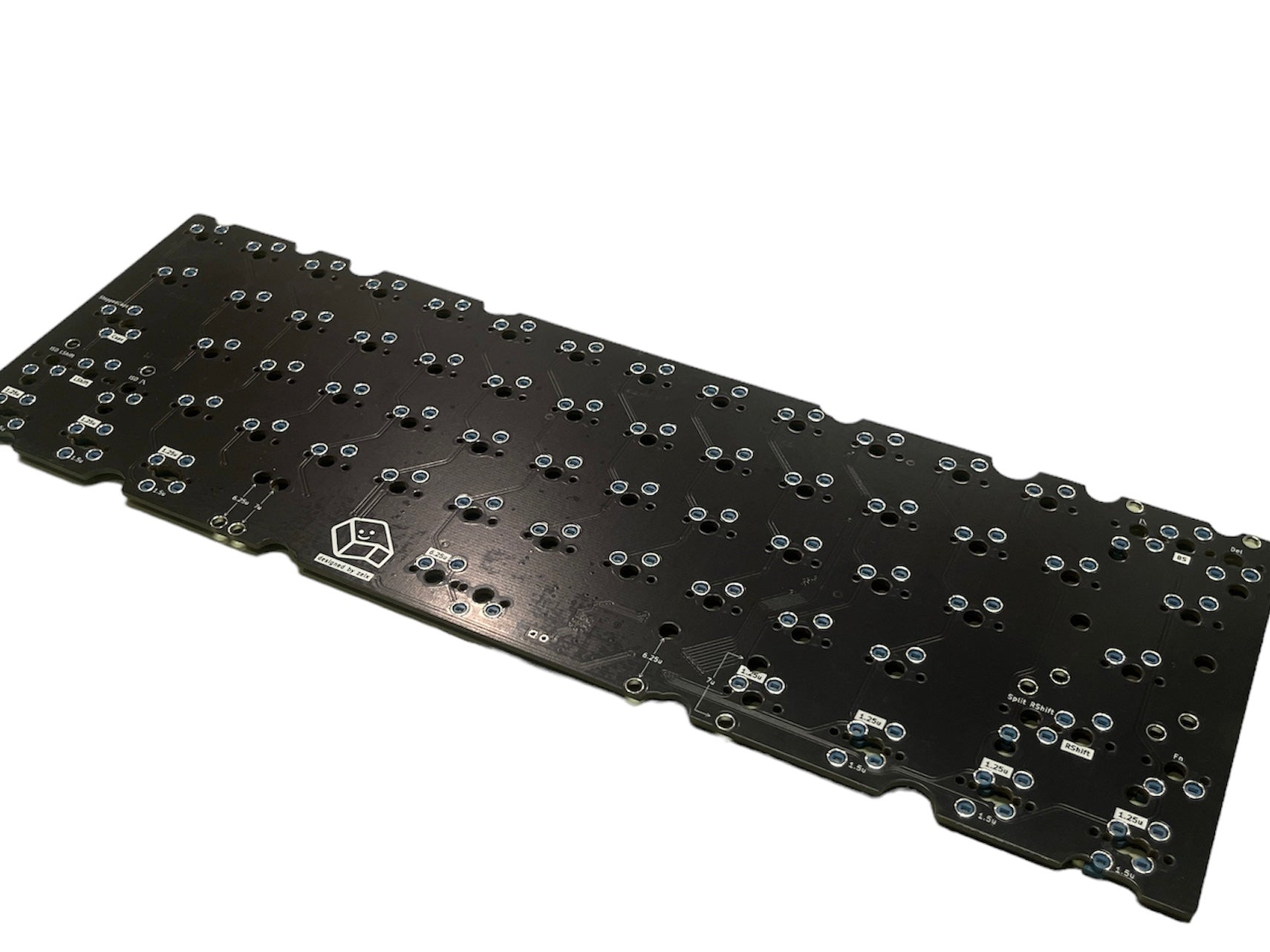
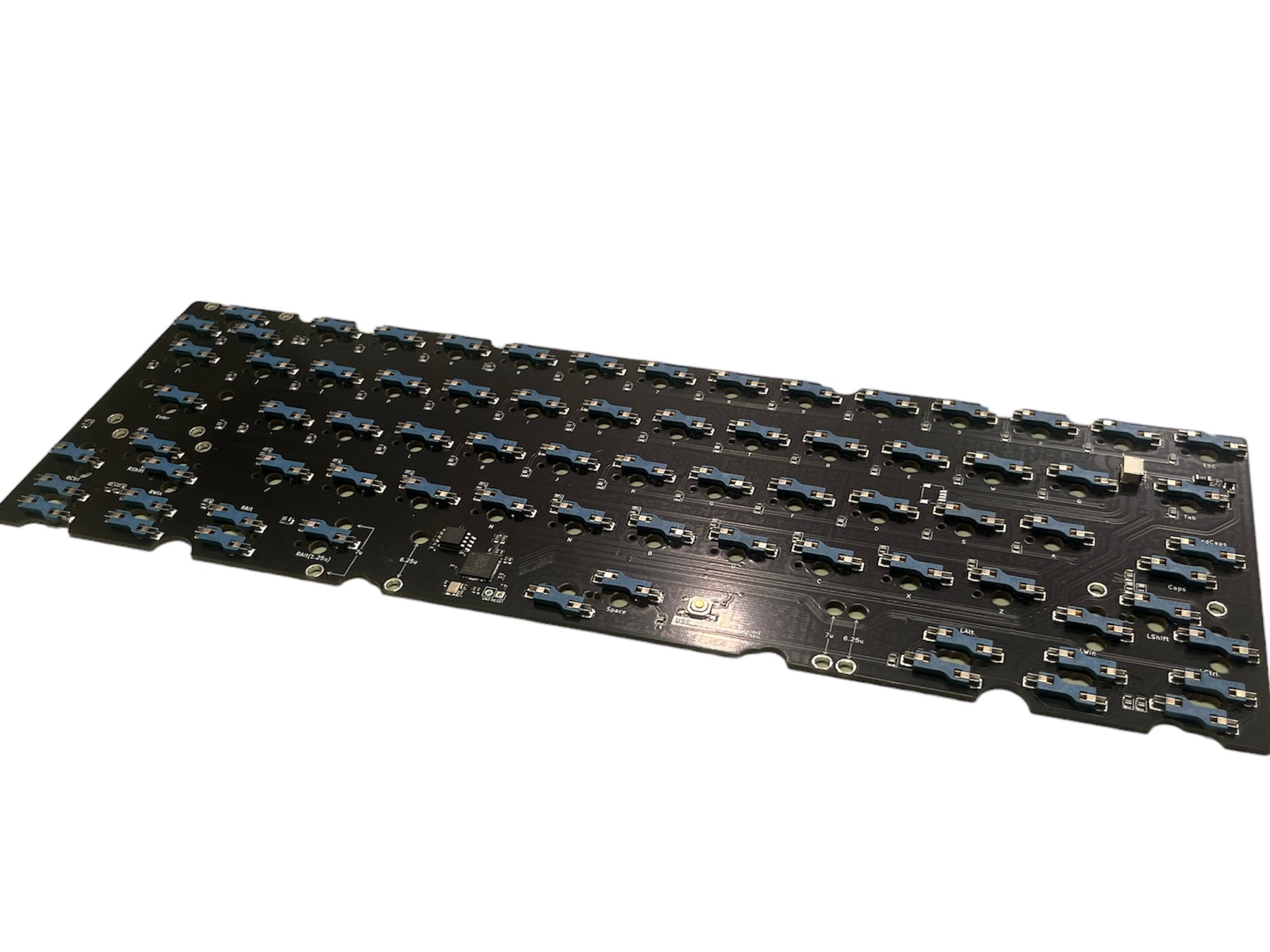
Specifications:
  • 2 Variants for JST Positioning
    • Standard JST
    • Alternate JST (Supports Unikorn R2.2)
  • H60 Footprint/Edge Cutouts (Note the north-facing enter)
  • QMK & VIA Compatibility
  • Multi Layout Support
    • Standard & Split Backspace
    • Standard & Split Right Shift
    • Standard & Split Left Shift
    • Standard & Stepped Caps Lock
    • ANSI(6.25u) & Tsangan(7u) Bottom Row
  • Thickness: 1.6mm

    Compatible with:

    • Standard 60% using JST
    • Unikorn R1, R2.1 & R2.2
    • Bakeneko V1, Cannonkeys Bakeneko
    • NOT COMPATIBLE WITH BAKENEKO V3

    Note:

    • Please note that for the Tsangan bottom row, the left and right Windows keys are labeled as 1.5u, despite actually being 1u in size. This will not affect the functionality of the PCB. Treat the bottom row as your usual Tsangan bottom row.
    • For a more refined fit within various keyboard cases, kindly take a moment to smooth out any sockets located along the PCB edge cutouts. This proactive measure helps prevent potential damage to your keyboard, for which we cannot assume liability.


    User Guide:

    • To reset the PCB for flashing, press and hold onto the button labelled "USB_BOOT" (located beside the spacebar on the back on the PCB) whilst plugging the PCB in. Once the button is released, a storage drive labelled "RPI-RP2" can be found in the file explorer (Finder for MacOS).
    • Transfer the .uf2 firmware file into that storage drive (drag/copy-paste) and you have successfully flashed the PCB with the firmware.
      QQ60 Hotswap PCB
      QQ60 Hotswap PCB

      Similar products

      160
      12

      7,000+ member community

      Come hang out with us!

      See new releases, share your setup, ask questions, and chat with the community.

      Join our Discord

      Follow along

      Find us elsewhere

      Instagram ↗ YouTube ↗

      Policies

      • Terms of Service
      • Privacy Policy
      • Groupbuy Policy
      • Refund Policy
      • Shipping Policy
      • Quality Expectations

      Connect with us

      • Contact Us
      • Collaborations
      • Store Updates
      • Store Locator

      © 2026, qwertyqop

      en
      • American Express
      • Apple Pay
      • Google Pay
      • Mastercard
      • Shop Pay
      • Union Pay
      • Visa
      • Menu
      • Search
      • Home
      • Account
      • Cart
      Cart

      Your cart is empty

      You have not added any cart items yet.

      Continue shopping
      • Refresh page
      • New window

      This website uses cookies to ensure you get the best experience on our website.

      Decline